This page is available in English.
Choose your preferred language to view the siteNotice CFDs are leveraged; you do not own the underlying. Client registration and trading use backoffice.activexbt.com and platform.activexbt.com; contracting entity ACTIVE CORP LTD (Saint Lucia). KYC/AML before funding.
Product: ActiveXBT offers contracts for difference (CFDs) and related leveraged products. You do not own the underlying asset. CFDs are complex instruments and carry a high risk of losing money rapidly due to leverage.
Third-party technology: Account registration, client portal, trading terminal, deposits, and withdrawals are provided through ActiveXBT client systems (for example backoffice.activexbt.com and platform.activexbt.com). Register and Login on this marketing site link to those environments, which are separate from this website. The contracting entity for your relationship is ACTIVE CORP LTD (Saint Lucia), subject to eligibility and onboarding checks. Where the terminal interface differs from the ActiveXBT marketing brand, that reflects the client application layout, not a different retail counterparty, unless you are informed otherwise in your legal agreements.
Before you fund an account: You must complete identity verification (KYC), sanctions screening, and other anti-money-laundering steps as required by law and by our policies. Deposit routes, payment processors, and available instruments are shown only after successful onboarding in the secure client area.
This marketing website does not accept deposits or display live payment domains; those appear only inside the partner client application after KYC.
Protection of client accounts and data
We maintain a cybersecurity programme for this website and related login surfaces: encryption in transit, hardened hosting, monitoring, and periodic reviews. Client money, segregation, and withdrawal rules are governed by the counterparty and disclosures in your onboarding pack—not by on-chain “cold storage” marketing claims on this marketing site.
Advanced security tools and measures
- Two-factor authentication (2FA), commonly implemented with an authenticator app, helps protect your account from unauthorised access when enabled in the client area.
- Optional withdrawal controls (for example destination checks) may be available in the onboarding application, depending on your profile and payment rails.
- Infrastructure partners apply industry-standard controls; details of any third-party custody or banking arrangements are provided where they apply to you—not generically on this page.
- Hardware security modules with a FIPS PUB 140-2 Level 3 rating or higher are deployed.
- Rigorous risk checks are performed after every order placement and execution.
- We use encrypted HTTPS to protect traffic to our website.
- Passwords are cryptographically hashed using bcrypt with a cost factor of 12, and all other sensitive data is encrypted.
- Cloudflare is employed to mitigate potential distributed denial-of-service (DDoS) attacks.
- Regular tests and evaluations are conducted by our technical team.
- Ongoing IT security assessments are performed to stay updated on new potential vulnerabilities.
Our environment is hosted on Amazon Web Services (AWS), which has a demonstrated track record in physical security and internal controls.
Trading infrastructure
The execution stack used with ActiveXBT is built for online CFD and margin trading: low-latency messaging, pre-trade checks, and ongoing monitoring of buying power, position size, and loss thresholds where configured by the venue. Actual behaviour depends on your account type and the live platform version.
Get Started
Registration is quick; approval and product access follow the onboarding checks shown in the client area.
Funds, withdrawals, and operational security
When you trade CFDs, you do not take delivery of physical commodities or digital coins through this marketing website. How client money is held, which banks or payment processors are used, and any internal treasury controls are described in your legal pack and the secure client application after login.
Where the venue supports it, high-value configuration changes (such as disabling 2FA or changing certain payout settings) may require manual review and support contact. This reduces the impact of account takeover attempts while keeping day-to-day trading flows smooth.
Two-Factor Authentication (2FA)
Two-factor authentication (2FA) is a security process that requires users to provide two different authentication factors to verify their identity. It offers a higher level of security compared to single-factor authentication (SFA), which typically involves providing only a password.
Enabling 2FA is one of the best ways to enhance the security of your account. The setup process is straightforward, and we strongly recommend enabling 2FA for your account immediately after completing the registration process. Our 2FA system uses a Time-based One-Time Password (TOTP) solution, which requires the use of the Google Authenticator app. It is more secure and reliable than using SMS for 2FA.
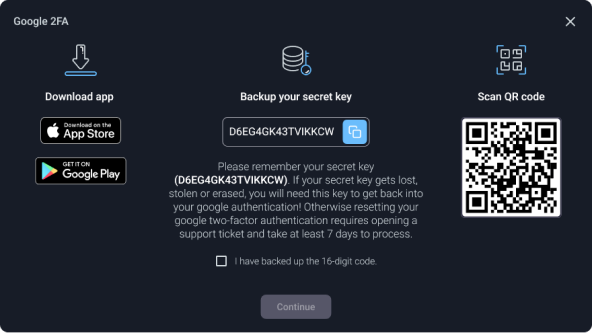
Follow these steps to enable 2FA:
- Download the Google Authenticator app for either iOS or Android.
- Access the System Preferences menu.
- Click the 'Enable GA' button in the Google Authenticator section.
- Backup your secret key and confirm it by selecting 'I backed up a 16-digit code.'
- Confirm the setup by entering the PIN code generated by 2FA.
The next time you access your account or withdraw funds, you will be prompted to provide a code from Google Authenticator.
Please note that to disable 2FA, you will need to contact our support at support@help.activexbt.com. This procedure may take up to 5 business days.
Withdrawal destination whitelisting
We offer additional account-level security measures to our customers, such as Address Whitelisting. This feature adds an extra layer of protection by allowing customers to whitelist specific withdrawal addresses.
When enabled in the client area, withdrawals may only be sent to destinations you have pre-verified. That limits the damage if credentials are stolen, though it does not remove market or leverage risk from open positions.
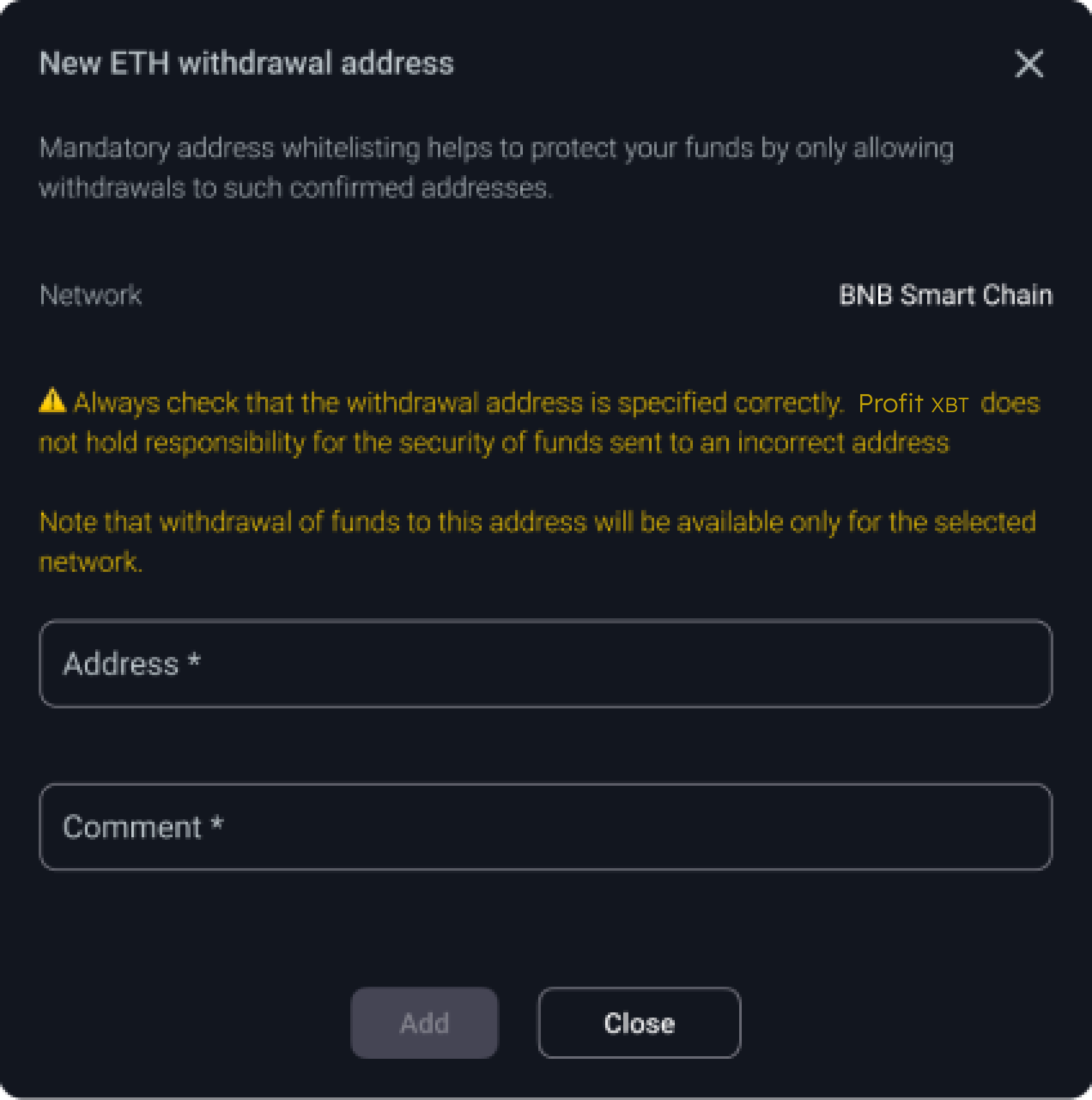
Follow these simple steps to whitelist a payout destination (when offered in your client area):
- Go to the Account section and select the Withdraw menu.
- Click the "Destination address" dropdown menu. Then, click "Add a new address."
- In the pop-up window, fill in the label and the destination details you want to use for withdrawals. Click "Add" to proceed.
- You will receive an email in your inbox. Click the confirmation link to whitelist the address. Please note that the link is only active for an hour.
- The confirmed destination will be added to the whitelist, and payouts will only be possible to that route until you change it through the same secure flow.
The next time you access your account or withdraw funds, you will be asked to provide a code from Google Authenticator.
Please note that to disable your 2FA, you will need to contact our support at support@help.activexbt.com. This procedure may take up to 5 business days.
For all questions, security issues or product related inquiries please contact us at support@help.activexbt.com